

How to set-up call forwarding for your direct dial
If you are leaving the office or would like to forward calls to another user simply follow this handy guide to setting up call forwarding. Please note: this guide will only work if your phone system is provided by Globe2. The process: Via the online portal Login to the business portal using the details sent […]
How to pause/resume/stop call recording during a call
If you have our feature-rich telephone system you can enjoy features such as the ability to pause or stop call recording live during a call in progress. Please note: this feature may need to be enabled by your system admin or by us. If you do not use our phone system, these features will not […]
How to quickly redial someone on a Yealink T42S, T46S or T48S
Being able to quickly redial someone is great and very time consuming, simply follow the below guide to learn how to quickly redial someone. The guide: On your Yealink phone press the redial button once which will take you to your placed calls. You can then press the redial once more to dial your last […]
How to access your voicemails on a Yealink T42S, T46S and T48S
Accessing your voicemails is very simply from the Yealink range of devices. The below guide will demonstrate how you can access your personal voicemails for your user. Guide: On your Yealink phone press the message button (looks like an envelope) or if you use our feature-rich phone system, you can alternatively dial 1571. Once you […]
How to access the phonebook on your Yealink T42S, T46S, T48S or Yealink W52P / W56H handset.
In this guide we are going to demonstrate how you can access your phonebook via your Yealink handset. Remember, you may need to ask us to first set this up for you, if you haven’t already. The process: Yealink T4x series. Click the directory key on your phone. This will then load the online phonebook. […]
How to transfer calls on a Yealink W52P or Yealink W56P handset.
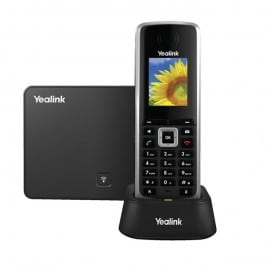
Transferring calls using a Yealink W52P, W52H, W56P, W56H, or Yealink W60P is easy and in this article we will provide you with a quick guide on how you can easily transfer calls via your Yealink handset. The process During a call press the options key and then select transfer. Then, enter a number you […]
How to set-up a 3-way conference call on a Yealink phone.
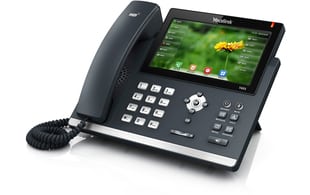
Setting up a 3-way conference call using a Yealink device such as a Yealink T42S, Yealink T46S or Yealink T48S is really simple and in this article we will provide you with a quick guide on how to do so. The process During a call press the conf (or conference on the Yealink T48S) button. […]
How to transfer calls on a Yealink T42S, Yealink T46S or Yealink T48S
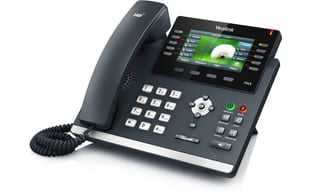
Learn how to transfer calls using a Yealink T42S, Yealink T46S or Yealink T48S is simple and in this article we will provide you with a quick guide on how to transfer calls. The process During a call press the transfer button. Then, enter a number you wish to transfer the call to (or select […]
Leased Line Offer for Businesses (2019)
To kick off the new year we are proud to announce that we have been working hard to get businesses the best deal for their IT services and we are sure you are going to like the sound of this one. To request a free no-obligation quote use the form at the bottom of the […]
Caught out by a phishing email
Sigh.. we’re always trying to reinforce internet safety to our customers, but I’m not too proud to admit that this weekend I got caught out with a phishing email. I have an ebay seller’s account, and received an email from ebay, relating to an item I had for sale. The sender (ebay) was genuine. What […]